Visit calendar and actions: how to organise a real estate agency's schedule
RealEstateCRM España · 5 October 2026
Monday, 9:40. An agent at a Valencia agency has the noon viewing in a phone note, a pending call to an owner on a sticky note stuck to her monitor, and Thursday's valuation in her personal Google calendar. At half eleven another viewing overruns, she rings a colleague to cover the noon one and finds out he never knew it existed. Nobody did anything wrong. The office schedule simply lives in four places and none of them belongs to everyone.
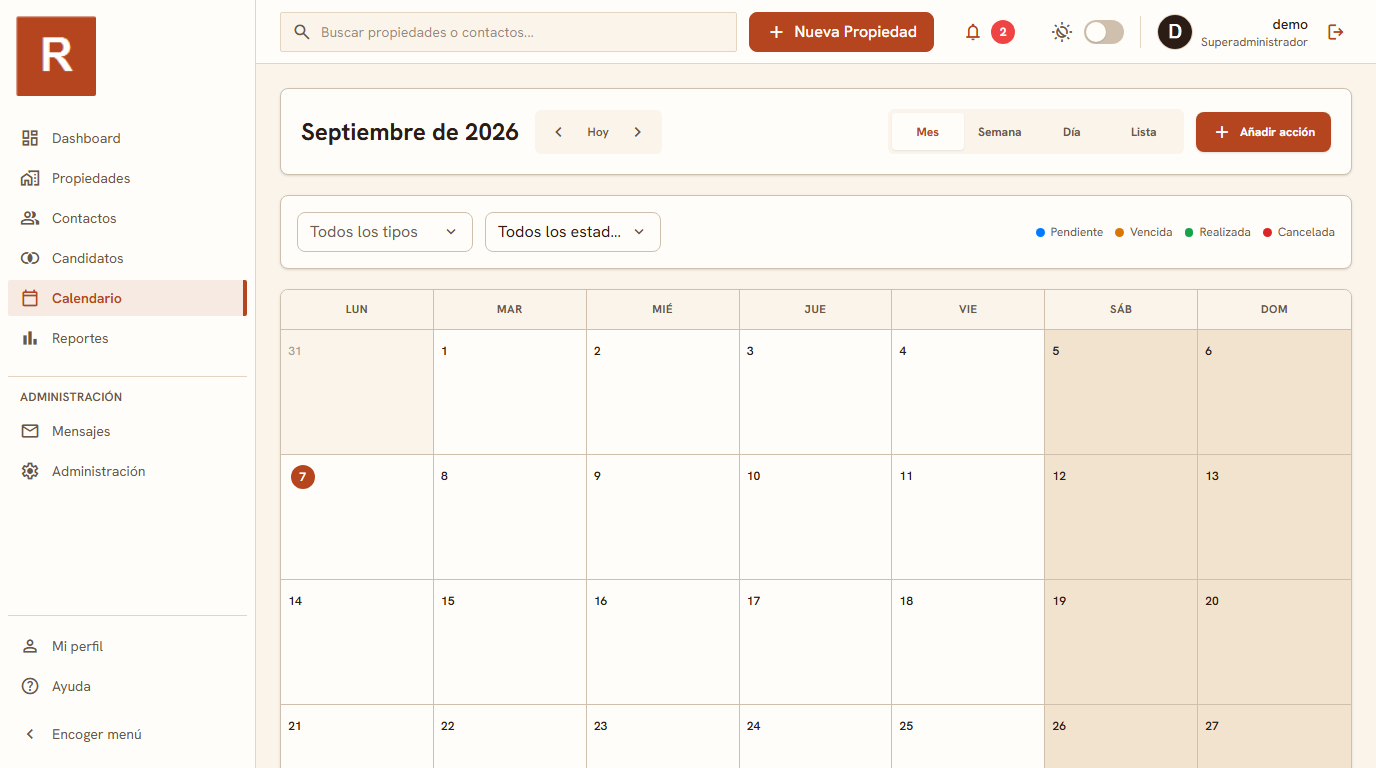
The best way to organise an agency's viewing calendar is a shared schedule where every viewing and every action is tied to the property and contact involved, so anyone in the office can see what is on today and with whom, without asking in the WhatsApp group. In RealEstateCRM that schedule is the Calendar module: actions and viewings in month, week or list view, each one attached to its record.
Three schedules for one morning
The problem is rarely a lack of calendars; there are too many. Each agent's phone holds appointments the others cannot see, paper holds whatever did not fit on the phone, and whoever answers the office phone replies from memory. While the portfolio is small, it holds up. With six agents and forty active listings, one viewing clashes with another, someone shows a flat that has just been reserved, or the call to the owner who has waited a week for news is forgotten.
There is a less obvious cost too: when an appointment lives in one person's head or phone, that person is irreplaceable for the day. If they fall ill or go on holiday, their schedule goes with them.
Viewings and actions, tied to the record
What changes with a calendar inside the CRM is that an appointment stops being loose text. A viewing is booked from the property or from the contact, and ends up linked to both. Open the penthouse on Calle Colón and you see the viewings it has had and the ones ahead; open the buyer's record and you see what you have shown them and when. There is no need to rebuild the story by digging through conversations.
Actions work the same way and cover what is not a viewing: ringing the owner, preparing paperwork, requesting the land registry extract, resending the PDF sheet to a client. They are small tasks, but they are exactly the ones that fall through when they only exist in someone's memory. Putting them in the calendar, with their property or contact beside them, turns them into something another person can see and pick up.
Month, week or list: each view does a different job
Month view is for perspective: spotting at a glance which weeks are packed with viewings, where an important valuation lands, or when there is room for an open-house day. Week view is the daily one, opened first thing on Monday to split the work across the team and stop two people being in two places at once.
The list is the most underrated. When you only want to know what is pending, with no grid, a date-ordered list reads in ten seconds and can be scrolled with a thumb from the car, just before walking into a viewing.
A case: the double viewing on Saturday
Picture a small office with three agents and a busy weekend. On Friday afternoon one of them books a viewing for Saturday at eleven in a flat in the north of town. A colleague, who does not know, promises another prospect the same flat at half past eleven, and the two buyers end up crossing in the entrance hall, each convinced the morning is theirs.
With a shared schedule, the second agent would have opened the flat's record, seen the eleven o'clock viewing and suggested twelve or the afternoon. It is a thirty-second difference when booking that avoids an awkward scene in front of two clients, and it does not depend on anyone remembering to tell anyone.
To see the calendar next to the other modules, it sits among everything else the CRM includes and builds on the property and contact records. So appointments are not lost before they are booked, it is worth reviewing how to follow up on leads; and to find the record a viewing belongs to quickly, global search helps a lot. That is what we aim to have covered in RealEstateCRM, so your schedule does not hang on a sticky note.